Spreadsheets are brilliant. They’re how loads of businesses get started, and there’s no shame in running on them. But there comes a point where the spreadsheet starts running you.
In short: You’ve probably outgrown spreadsheets if you’ve got competing versions of the same file, only one person really understands it, staff copy and paste between systems, errors keep slipping through and you can’t see who changed what. A simple custom web app gives you one source of truth, proper permissions and automation.
How do I know if my business has outgrown spreadsheets?
There’s no single moment. It tends to creep up on you as the team grows, the file gets bigger and more people rely on it. Here are the five signs we see most often.
1. Version chaos
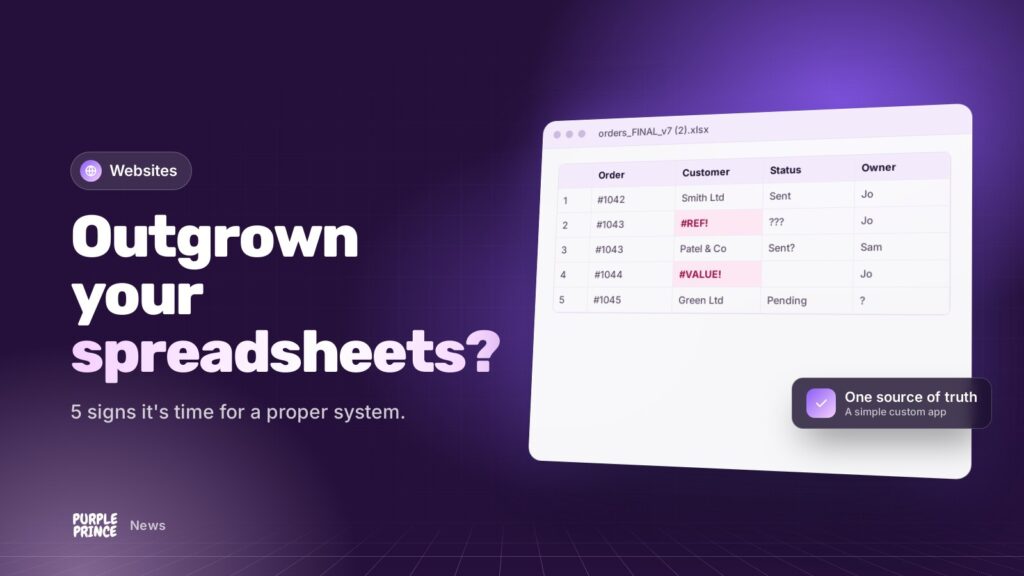
“Orders_FINAL_v3_Dave_edits.xlsx”. Sound familiar? When there are several copies floating around by email or in shared folders, nobody’s quite sure which one’s right. People make decisions on old numbers, and someone spends Friday afternoon merging changes by hand.
2. Only one person really understands it
Every business has one: the colleague who built the master spreadsheet, with its hidden tabs, nested formulas and macros. When they’re on holiday, things stall. If they leave, you’re in trouble. That’s a single point of failure, which simply means one thing that brings everything down if it goes wrong.
3. Copy and paste between systems
Orders come in from your website, get typed into a spreadsheet, then retyped into your accounts package and maybe a courier’s portal too. Every hop costs time and adds a chance to get it wrong. If your team’s main tool is Ctrl+C, that’s a sign.
4. Errors keep slipping through
A formula dragged one row too far. A number typed as text. A row sorted without its neighbours. Spreadsheets will happily let you do all of this without a word of warning. Small slips turn into wrong quotes, missed deliveries or awkward phone calls.
5. No audit trail
Who changed the price? When was that order cancelled? Why is this customer marked as paid? With a shared spreadsheet, the honest answer is often “no idea”. That’s frustrating day to day, and a real headache if you ever need to show your working to an accountant or a customer.
If one spreadsheet going missing would ruin your week, it’s no longer a spreadsheet. It’s your business system, and it deserves to be treated like one.
What’s the alternative to spreadsheets?
For many businesses, the answer is a simple custom web app. Don’t let the phrase put you off. It’s just a private website, built around the way you already work, that your team logs into from any browser.
Off-the-shelf software is worth checking first, and sometimes it fits well. Where it doesn’t, a bespoke app means you stop bending your processes to suit someone else’s software.
What does a custom web app actually look like?
Think of your spreadsheet, but grown up:
- One source of truth. Everyone works on the same live data. No versions, no merging.
- Forms with checks. Fields that only accept a valid date, a real postcode or a number in the right range, so mistakes get caught at the door.
- Logins and permissions. Sales see what sales need. Only managers can change prices.
- A full history. Every change logged with who, what and when.
- Dashboards. The numbers you check every morning, on one screen, always up to date.
- Exports when you need them. You can still pull data into a spreadsheet for a one-off analysis. Nobody’s taking your spreadsheets away completely.
Where does automation come in?
Automation is where the real time savings live. Once your data sits in one proper system, it can do jobs for you:
- Pull new orders straight in from your website or online shop.
- Send data to your accounts package automatically through an API (a secure connection that lets two systems talk).
- Email a customer when their job changes status.
- Flag low stock, overdue invoices or jobs that have stalled.
- Generate quotes, delivery notes or reports as PDFs at the click of a button.
And if it’s useful, AI can help too, for example by reading supplier invoices and filling in the details for someone to check.
How do you move from spreadsheets to a web app?
It’s less scary than it sounds. Here’s how we tend to approach it:
- Have a chat. We look at your spreadsheets and ask how they’re really used, warts and all.
- Pick the most painful bit first. No need to replace everything in one go.
- Build direct, tweak together. We build a working version early so you can click around and tell us what’s right and what’s not.
- Bring your data across. We import your existing spreadsheet data and tidy it up on the way.
- Run it alongside, then switch. Once everyone’s confident, the old spreadsheet retires.
We usually build these apps with Laravel, a well-established PHP framework, and host them on our own NGINX servers with daily off-site backups and 24/7 monitoring.
Ready to ditch the spreadsheets?
Our ditch the spreadsheets service is built for exactly this. For bigger projects, have a look at our bespoke web applications and Laravel development pages.
If any of these five signs made you wince, get in touch for a no-obligation chat about what you’ve outgrown.