PHP 8.2 has about two months of security fixes left. If your website runs on it, now’s a good moment to plan the move, rather than a frantic one in January.
In short: PHP 8.2 end of life is 31 December 2026. After that, the PHP project stops releasing security fixes for it. If your site runs on 8.2, plan a tested upgrade to PHP 8.3, 8.4 or 8.5 now, checking your platform, plugins and custom code support the new version first.
When does PHP 8.2 reach end of life?
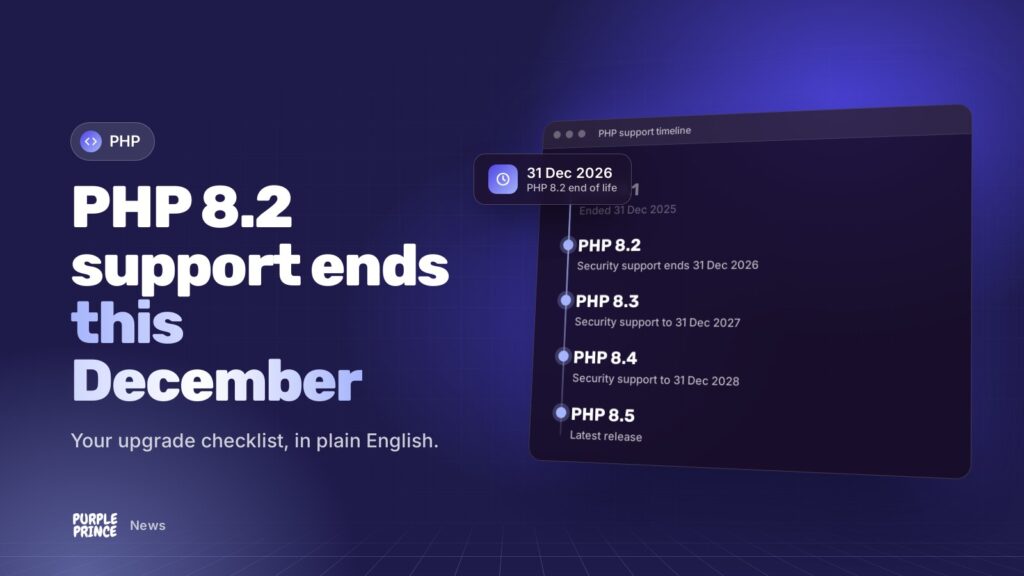
According to PHP’s official supported versions page, PHP 8.2’s security support ends on 31 December 2026. Its active support, the period when everyday bugs get fixed, already ended on 31 December 2024. Since then it’s only had security fixes.
From 1 January 2027, it gets nothing at all from the PHP project. Here’s where the other versions stand:
- PHP 8.3: security fixes until 31 December 2027.
- PHP 8.4: security fixes until 31 December 2028.
- PHP 8.5: security fixes until 31 December 2029.
Some hosting providers drop old versions earlier than PHP’s own deadline, so check your host’s plans too.
Why is PHP2Shell a timely reminder?
Last week PHP released urgent fixes for PHP2Shell, two critical flaws in PHP itself that can allow attackers to run code on a web server without logging in. PHP 8.2 got a fixed release, 8.2.35, because it’s still in security support.
PHP 8.1, which reached end of life at the end of 2025, didn’t get an official release. Owners of 8.1 sites were left relying on distribution backports or a rushed upgrade. Next time something like this happens after 31 December, that’ll be PHP 8.2’s situation.
The best time to upgrade PHP is when nothing’s on fire. PHP2Shell showed exactly what happens to sites that leave it too late.
What does PHP 8.2 end of life mean for my business?
Your site won’t stop working on 1 January. But from then on:
- New security flaws in PHP 8.2 won’t be fixed by the PHP project.
- Plugins, extensions and frameworks will steadily drop support for it.
- Anyone asking about your security setup, like card payment assessors or insurers, may raise an eyebrow at unsupported software.
Newer PHP versions also tend to be quicker, so there’s usually a speed bonus for upgrading too.
What does a PHP upgrade involve for Magento, WordPress and Laravel?
The PHP upgrade itself is often the easy bit. The work is making sure everything sitting on top of PHP is happy with the new version.
Magento and Adobe Commerce
Magento ties each release to specific PHP versions, so a PHP upgrade usually means a Magento upgrade too. The newest release, 2.4.9, targets PHP 8.5 and no longer supports PHP 8.2. Check Adobe’s system requirements for your exact version.
Expect to test every third-party extension, your theme and any custom modules. It’s very doable, but it’s a proper project, so give it time. Our Magento support team can take it on.
WordPress and WooCommerce
WordPress itself copes well with new PHP versions and currently recommends PHP 8.3 or greater. The risk lies in plugins and themes, particularly old, abandoned or heavily customised ones. WooCommerce stores should give checkout, payment gateways and shipping plugins extra attention.
Our website support covers this for WordPress sites.
Laravel and bespoke PHP applications
Laravel 12 supports PHP 8.2 to 8.5, while Laravel 13 needs PHP 8.3 or higher. Older Laravel versions may need upgrading first, along with your Composer packages. Bespoke PHP apps that haven’t been touched in a while need a careful look for removed or deprecated features.
Our PHP and Laravel support team can take that on.
What should be on my PHP 8.2 upgrade checklist?
Here’s the order we’d work in. Share it with your developer or host.
- Confirm your current version. In WordPress, it’s under Tools > Site Health > Info > Server. Otherwise, ask your host which version serves each site.
- Choose a target. Pick the newest PHP version your platform supports. For most sites, that’s 8.3 or 8.4, with 8.5 where the platform allows.
- Take a full backup of files and database, and check you can restore it.
- List everything that runs on PHP: platform, theme, plugins or extensions, custom code, scheduled tasks and integrations.
- Update the platform and add-ons to versions that support your target PHP. Replace anything abandoned.
- Test on a staging copy running the new PHP version. Click through checkout, forms, logins, admin screens and any imports or exports.
- Read the error logs for warnings and deprecation notices, and fix them.
- Plan the switch for a quiet period, with a rollback plan ready.
- Go live and monitor errors, speed and orders for a few days.
- Diary the next one. PHP 8.3’s security support ends on 31 December 2027, so if you land there, you’ll be doing this again next year.
How long have I got to upgrade from PHP 8.2?
The official deadline is 31 December 2026. Realistically, with the festive period in the way, if you haven’t started by mid-November you’re cutting it fine.
Busy online shops may want to wait until after their peak trading season and accept a short period on 8.2 after its end of life, but that should be a conscious, short-term decision, not an accident.
If your host or developer hasn’t mentioned it yet, ask them.
Want a hand working out what your upgrade involves? Get in touch for a no-obligation chat.