Magento 2.4.6 reaches the end of its standard support on 11 August 2026. If your store runs on it, now’s the time to plan your next move, calmly and properly.
In short: Adobe ends standard support for Magento and Adobe Commerce 2.4.6 on 11 August 2026. After that, Magento Open Source stores on 2.4.6 stop getting regular security patches. Adobe Commerce customers get extra time. The supported lines are 2.4.7, 2.4.8 and 2.4.9, so it’s time to plan an upgrade.
What does Magento end of support actually mean?
Every Magento release has a lifecycle. While a version is supported, Adobe publishes quality fixes and security patches for it. Once it reaches end of support, those patches stop.
Your store doesn’t switch off. It keeps working exactly as before. But when a new vulnerability (a security weakness) is found, there won’t be an official fix for your version. Adobe’s own wording is that staying on an unsupported version puts your store at risk of security vulnerabilities.
End of support doesn’t break your shop overnight. It just means nobody’s fixing the locks anymore.
Which Magento versions are supported in 2026?
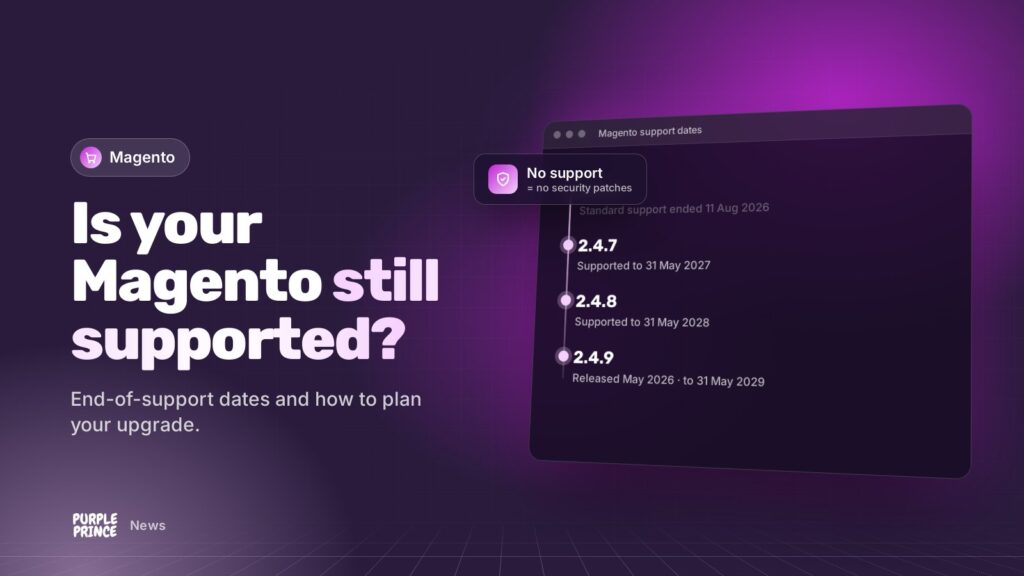
Here are the dates from Adobe’s published lifecycle policy for the current 2.4 releases:
- 2.4.6 (released March 2023): standard support ends 11 August 2026.
- 2.4.7 (released April 2024): standard support ends 31 May 2027.
- 2.4.8 (released April 2025): standard support ends 31 May 2028.
- 2.4.9 (released 12 May 2026): standard support ends 31 May 2029.
Adobe occasionally adjusts its lifecycle, so it’s always worth checking the official page linked at the bottom of this post.
Does Adobe Commerce get longer support than Magento Open Source?
Yes, for these older releases. Adobe offers one year of extended support, with quality and security patches, to Adobe Commerce customers on 2.4.6 and 2.4.7. For 2.4.6, that runs to 31 August 2027, followed by a one-off security-only period to 31 May 2028.
Adobe’s policy describes that extension specifically for Adobe Commerce customers. If you’re on Magento Open Source, the community edition most smaller stores use, plan on the standard support date being your cut-off.
How do I check which Magento version I’m on?
- In the admin: log in and scroll to the very bottom of any page. The footer shows your Magento version.
- On the server: your developer can run
bin/magento --versionfrom the store’s root folder. - Check the patch level too: a version like 2.4.7-p5 means the fifth security patch for 2.4.7. Being on a supported line but several patches behind still leaves gaps.
- Ask your host or developer: they should be able to tell you in seconds.
Is it safe to stay on Magento 2.4.6?
In the short term, nothing dramatic happens on the day support ends. But the risk grows every time a new vulnerability is published and there’s no official patch for your version.
Card payments, customer data and your reputation are all on the line, so running an unsupported version for long isn’t something we’d recommend. Some hosting environments and payment setups also expect you to keep software patched.
The calm, sensible approach is to plan an upgrade now, rather than rush one later.
Why not just wait until something goes wrong?
Because upgrades done in a hurry are where things get missed. If a serious vulnerability is announced and you’re two versions behind, you’re suddenly trying to do a big upgrade under pressure, often at the worst possible time of year.
Planned upgrades let you test properly, pick a quiet trading window and fix any extension niggles without a deadline breathing down your neck. They’re also a good chance to clear out old extensions and pick up the performance and admin improvements that come with newer releases.
How should I plan a Magento upgrade?
1. Audit what you’ve got
List your extensions, your theme and any custom code. Check each extension has a version that supports your target release. This is usually where the real work hides.
2. Check the server requirements
Newer Magento versions need newer versions of PHP, the database and search engine. Make sure your hosting can provide them. If it can’t, that’s part of the plan.
3. Pick your target
Jumping to the newest supported release, currently 2.4.9, gives you the longest runway before you go through this again.
4. Upgrade on staging first
Do the upgrade on a staging site (a private copy of your store), then test everything: browsing, search, basket, checkout, payments, emails, admin tasks and integrations.
5. Launch at a quiet time and keep watching
Take a fresh backup, go live during a quiet trading period, and monitor closely for the first few days.
How can we help with Magento end of support?
We’re certified Magento developers and have been working with Magento since 2017. Our Magento support team handles upgrades and security patching, and our ongoing Magento support keeps you current so Magento end of support dates never sneak up on you.
Our Magento hosting runs on our own NGINX and PHP-FPM stack, kept in step with what each Magento release needs, with daily off-site backups and 24/7 monitoring.
Not sure where your store stands? Get in touch and we’ll check your version with you.